

编辑内容:
#include<QApplication> #include<QLabel> int main(int argc,char *argv[]) { QApplication app(argc,argv); QLabel *label=new QLabel("hello qt"); label->resize(200,100); label->show(); return app.exec(); } //保存并退出 shift ; wq2.编译hello.cpp
查看qmke 版本号
报错:
qmake: could not exec ‘/usr/lib/i386-linux-gnu/qt4/bin/qmake’: No such file or directory
处理方法:
#cd /usr/bin #ls -la qmake可以看到qmake 为一个链接 指向qtchooser
lrwxrwxrwx 1 root root 9 5月 24 20:19 qmake -> qtchooser
#apt-get install g++rwxrwxrwx 1 root root 9 5月 24 20:19 qmake1 -> qtchooser
#mv qmake qmake1 //备份为qmake1创建链接qmake 链接到 /opt/qtsdk-2010.05/qt/bin/qmake qmake
# ln -s /opt/qtsdk-2010.05/qt/bin/qmake qmake # la -al qmake可以看到已创建
lrwxrwxrwx 1 root root 31 6月 4 00:45 qmake -> /opt/qtsdk-2010.05/qt/bin/qmake
3.编译并运行
# qmake -project //生成*.pro #qmake hello.pro #makeg++ -c -pipe -O2 -Wall -W -D_REENTRANT -DQT_NO_DEBUG -DQT_GUI_LIB -DQT_CORE_LIB -DQT_SHARED -I/opt/qtsdk-2010.05/qt/mkspecs/linux-g++ -I. -I/opt/qtsdk-2010.05/qt/include/QtCore -I/opt/qtsdk-2010.05/qt/include/QtGui -I/opt/qtsdk-2010.05/qt/include -I. -I. -o hello.o hello.cpp
g++ -Wl,-O1 -Wl,-rpath,/opt/qtsdk-2010.05/qt/lib -o hello hello.o -L/opt/qtsdk-2010.05/qt/lib -lQtGui -L/opt/qtsdk-2010.05/qt/lib -L/usr/X11R6/lib -lQtCore -lpthread
编译完后文件列表
hello hello.cpp hello.o hello.pro Makefile
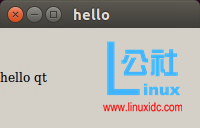
运行:
在Ubuntu Linux上安装搜狗输入法及对Qt Creator的支持
Linux下为刚安装好的Qt Creator 创建桌面启动图标